The Visual Ear Wax Cleaner features a 5M camera with luminous LED lights, providing a clear and detailed view inside the ear canal for safe, precise earwax removal. Designed as an endoscope, it enhances ear care by allowing real-time monitoring to prevent injury. Its ergonomic design ensures comfortable handling during use, making it an essential tool for effective and hygienic ear cleaning.
SPECIFICATIONS
Applications: Earwax removal, oral/nasal inspections, pre-doctoral examinations
Brand Name: NoEnName_Null
Choice: yes
Color Options: Classic Black / Pearl White
Dimensions: 143mmx14mm/ 5.63in x 0.55in
Hign-concerned Chemical: None
Is Batteries Included: Yes
Item Type: ear care
Material: Medical-grade silicone (ear scoops), ABS plastic (camera body),Medical-grade silicone (ear scoops), ABS plastic (camera body)
Model Number: Smart Ear Care Kit
Product Name: Smart Ear Care Kit
Service: Fast shipping, Free shipping, Customs free products
Size: 143mmx14mm/ 5.63in x 0.55in
Source of Information: NO-7 Best Store No.1102751728
Stock: Sufficient
Suitable For: Adults, children, pets, healthcare professionals
Support: Retail, Wholesale, Dropshipping
Type 1: Ear Wax Cleaner
Type 10: Ear Sticks
Type 11: USB C Charging
Type 12: WIFI Connection
Type 13: 5M Camera
Type 14: 1296P Resolution
Type 15: 6 LED Lights
Type 16: Smart Ear Cleaner
Type 17: Safe Earwax Removal
Type 18: Earpick
Type 19: Visual Ear Wax Cleaner with Camera
Type 2: Ear Wax Removal
Type 20: Smart Earwax Removal Tool with 1296P Camera
Type 21: Otoscope Ear Cleaning Kit with 5M Resolution
Type 22: 6 LED Light Ear Camera Earpick
Type 23: USB C Charging WIFI Ear Endoscope
Type 24: Safe Ear Care Tools for Wax Removal
Type 25: At-home ear wax removal camera for adults
Type 26: Kids safe ear cleaner with LED light and camera
Type 27: Wireless ear inspection tool for earwax visualization
Type 28: 1296P HD otoscope with 6 adjustable LED lights
Type 29: 5M pixel ear camera with USB C fast charging
Type 3: Ear Cleaning Kit
Type 30: WIFI connected ear endoscope for real-time viewing
Type 31: Non-invasive earwax removal tools for sensitive ears
Type 32: Stop Q-tip damage: visual ear cleaner with camera
Type 33: Ear wax blockage detection kit with live video feed
Type 34: Elderly-friendly ear cleaning kit with large screen display
Type 35: Travel-size smart ear cleaner with rechargeable battery
Type 36: Vet-recommended ear inspection tool for pets
Type 4: Earwax Removal Tool
Type 5: Ear Camera
Type 6: Otoscope with Camera
Type 7: Visual Ear Cleaner
Type 8: Ear Care Tools
Type 9: LED Ear Otoscope
Visual Ear Wax Cleaner with Camera Safe Earwax Removal Endoscope with 5M Camera Luminous Otoscope Ear Cleaning Tools Ear Care
Charge the device immediately.
-
Likely Cause: The Visual Ear Pick is linked to a previous device.
-
Solution: Power off the unit, reboot it, then try reconnecting.
-
Powering On: Light blinks.
-
Wi-Fi Connected: Light stays solid (lit).
-
Low Battery: Light flashes rapidly.
-
Charging: Light stays solid (lit).
-
Fully Charged: Light turns off.
Due to the ear canal's curvature, gently adjust the ear speculum's position during use to get a clear view of the eardrum.
The lens is fixed-focus. Objects appear sharpest when 1.5 to 2 cm away.
Fine-tune the distance between the ear speculum and the ear to achieve precise focus and a clear image.
-
Check Surroundings: Survey your environment before use. Do not use the product where people are actively moving to avoid collisions and injuries.
-
Child Safety: Children should not use this product alone to prevent accidental injury.
-
Water Damage: Do not submerge the main unit in liquids.
-
Battery Maintenance: The product has an internal rechargeable lithium battery. If not used frequently, charge it at least once a month.
-
Normal Heating: The product temperature may rise slightly during use (not exceeding 45°C / 113°F). This is normal; please use with confidence.
-
Charging Safety: Do not charge the product with a charger or power bank that has an output voltage higher than 5V. Use only a standard 5V charger.
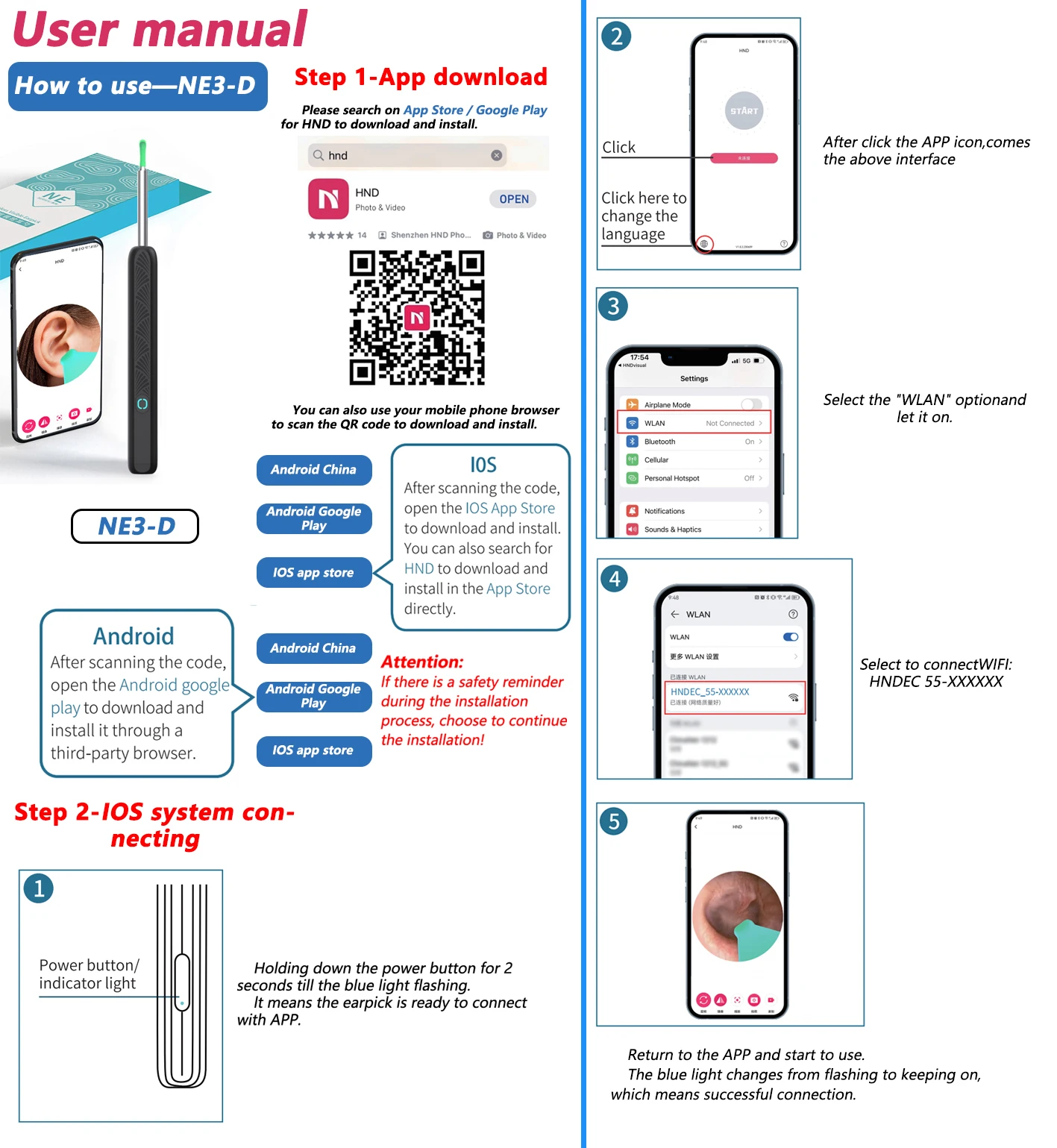
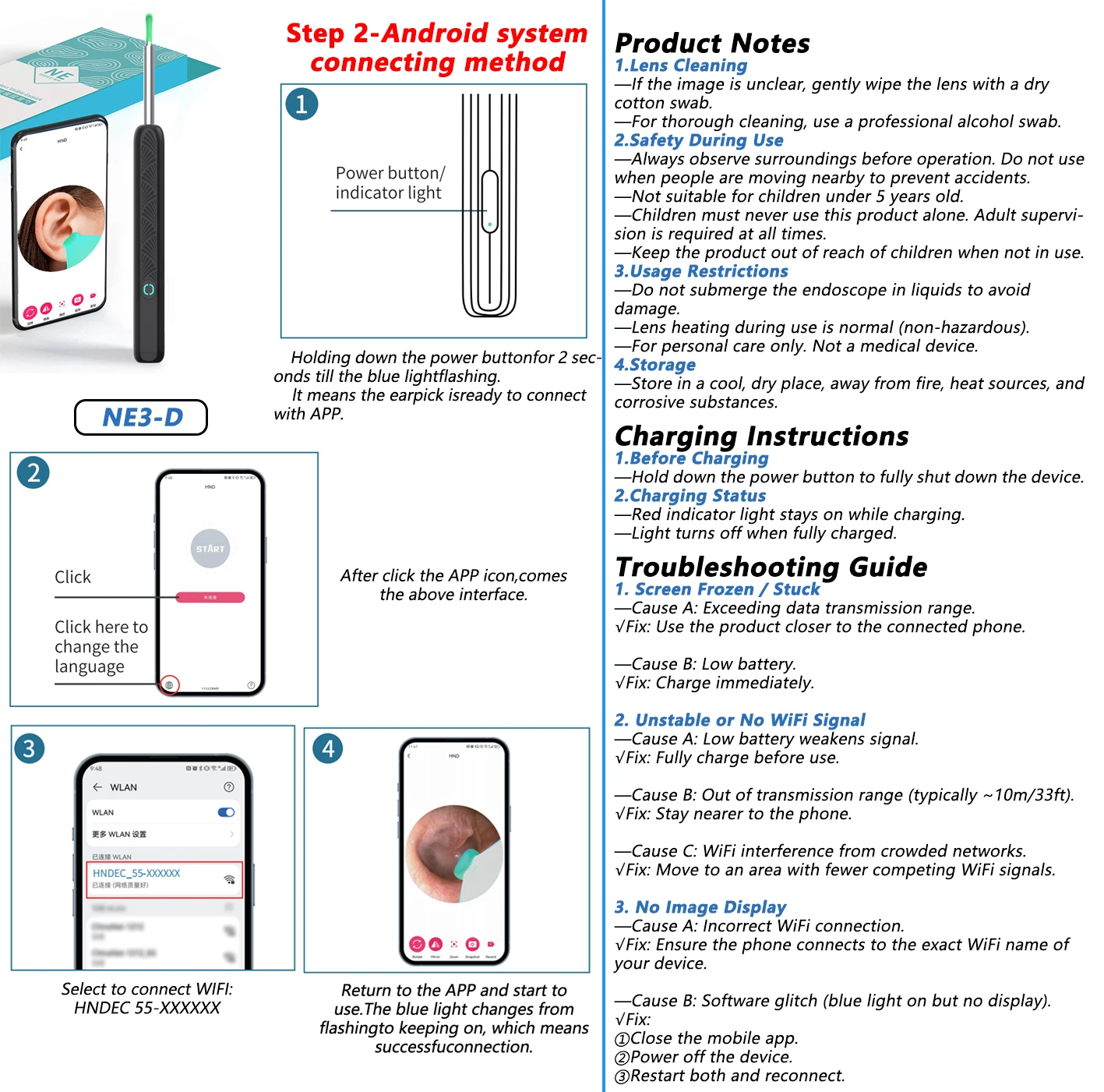
-
If the image is unclear, gently wipe the lens with a dry cotton swab.
-
For thorough cleaning, use a professional alcohol swab.
-
Always observe surroundings before operation. Do not use when people are moving nearby to prevent accidents.
-
Not suitable for children under 5 years old.
-
Children must never use this product alone. Adult supervision is required at all times.
-
Keep the product out of reach of children when not in use.
-
Do not submerge the endoscope in liquids to avoid damage.
-
Lens heating during use is normal (non-hazardous).
-
For personal care only. Not a medical device.
Store in a cool, dry place, away from fire, heat sources, and corrosive substances.
-
Screen Frozen / Stuck
-
Unstable or No WiFi Signal
-
Cause A: Low battery weakens signal.
Fix: Fully charge before use.
-
Cause B: Out of transmission range (typically ~10m/33ft).
Fix: Stay nearer to the phone.
-
Cause C: WiFi interference from crowded networks.
Fix: Move to an area with fewer competing WiFi signals.
-
No Image Display
🔥 Features
1. 📸 Ultra-High-Definition Imaging
✅ Equipped with dual-resolution options (1080P HD cameras) and cold-light LEDs, the device offers a 360° wide-angle view for crystal-clear visualization of ear canals, nasal cavities, and oral areas.
2. 🌡️ Body-Safe Temperature Design
✅ The camera’s surface temperature mimics human body warmth, ensuring comfort during use for adults, children, and even pets.
3. 📱 Seamless Cross-Platform Compatibility
✅ Works effortlessly with iOS and Android devices via Wi-Fi connectivity. The intuitive app stores images/videos and allows easy transfer to phone album.
4 .IP67 Waterproof & Long-Lasting Battery
✅ Waterproof lens enables easy cleaning, and the 130mAh rechargeable battery lasts up to 30 days on a single charge (Type-C fast charging) .
5. 🎁 Comprehensive All-in-One Kit
✅Earwax Removal Kit with camera and LED light*1, ear scoops*6, Daily ear care kits*8, earbud storage bottle*1, Charging Cable*1, Easy-to-follow instruction manual*1. You can use it at any time for convenient and efficient earwax removal.
📋 Specifications
🏷️ Product Name: Smart Ear Care Kit
📏 Dimensions: 143mmx14mm
🎨 Color Options:Classic Black / Pearl White
⚙️ Material: Medical-grade silicone (ear scoops), ABS plastic (camera body)
✅ Suitable For: Adults, children, pets, healthcare professionals
🎯 Applications: Earwax removal, oral/nasal inspections, pre-doctoral examinations, acne/blackhead extraction
🔥 Product list
Option 1: Y39 Basics Black/White ×1
Option 2: NE3-D Basics Black/White ×1
Option 3: Y39 8Pcs Set Black/White ×1
Option 4: NE3-D 8Pcs Set Black/White ×1
❓ Why Choose Us?
🛡️ Tech-Driven Precision: Dual HD cameras + medical-grade safety.
⏱️ Effortless Convenience: 30-day battery, waterproof, and cross-device support.
🎯 Versatile Value: From ear care to skincare, one tool solves multiple needs.
🏥 Application Scenarios
Scenario 1: Family Ear Hygiene
-
👉 Pain Point: Traditional methods risk eardrum damage and lack visibility.
-
👉 Solution: Use the camera to safely guide earwax removal with real-time visuals.
-
✅Outcome: 90% reduction in accidental injuries; kids/pets cooperate better.
Scenario 2: Pre-Doctoral Examination
-
👉 Pain Point: Anxiety about unknown ear/nasal issues before clinic visits.
-
👉 Solution: Perform preliminary inspections at home, capture images for professional analysis.
✅Outcome: Saves 50% of unnecessary clinic trips; empowers proactive health management.
Product Q&A Knowledge Base
Y39 Smart Otoscope
🛠 Troubleshooting
🔹 No image/frozen screen/artifacts?
🔹 Device won’t turn on + LED flashing?
🔹 Can’t establish connection?
💡 Indicator Lights
🔵 Blinking blue at startup?
🔴 Rapid red flashing (2Hz)?
🔋 Charging status?
📸 Usage Guidance
👂 Clear eardrum view?
🎯 Optimal focus distance?
⚠️ Safety Precautions
🚫 Crowded areas?
👶 Children under 15?
🌊 Waterproof?
NE3-D Digital Endoscope
🧼 Maintenance
🧽 Blurry lens?
⚠️ Safety Precautions
🧒 Minimum age?
💧 Underwater use?
🔥 Lens heating?
🔋 Charging Process
⚡ Prepare to charge?
🔴 Charging status?
-
Solid red = 0-80%
-
Blinking red = 80-99%
-
Off = 100%
🛠 Troubleshooting
❄️ Screen freezes?
-
Stay within 3m of phone
-
Charge if battery <20%
-
Close other camera apps
📶 Wi-Fi drops?
-
Charge to 50%+ before use
-
Avoid microwaves/Bluetooth
-
Change Wi-Fi channel in app
🖥️ No image display?
-
Confirm connection to "NE3D-XXXX"
-
Force-stop and reopen app
-
Check camera permissions


